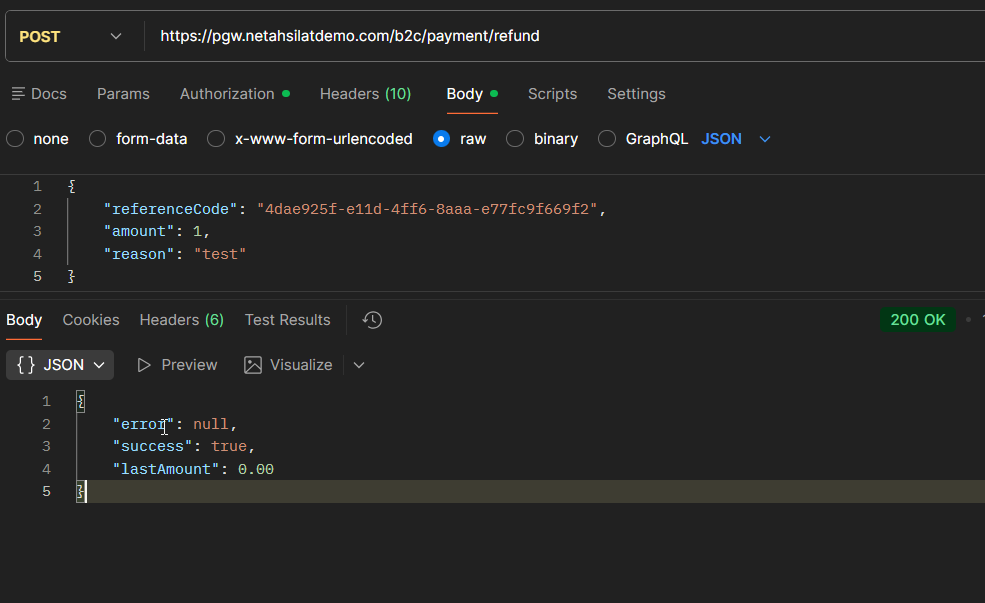
10. API Integration (Detailed)
Without using a widget, the entire payment process is managed by the merchant backend. This method is recommended for integrations that require full control and customization.
10.1 API Payment Flow (Step-by-Step)
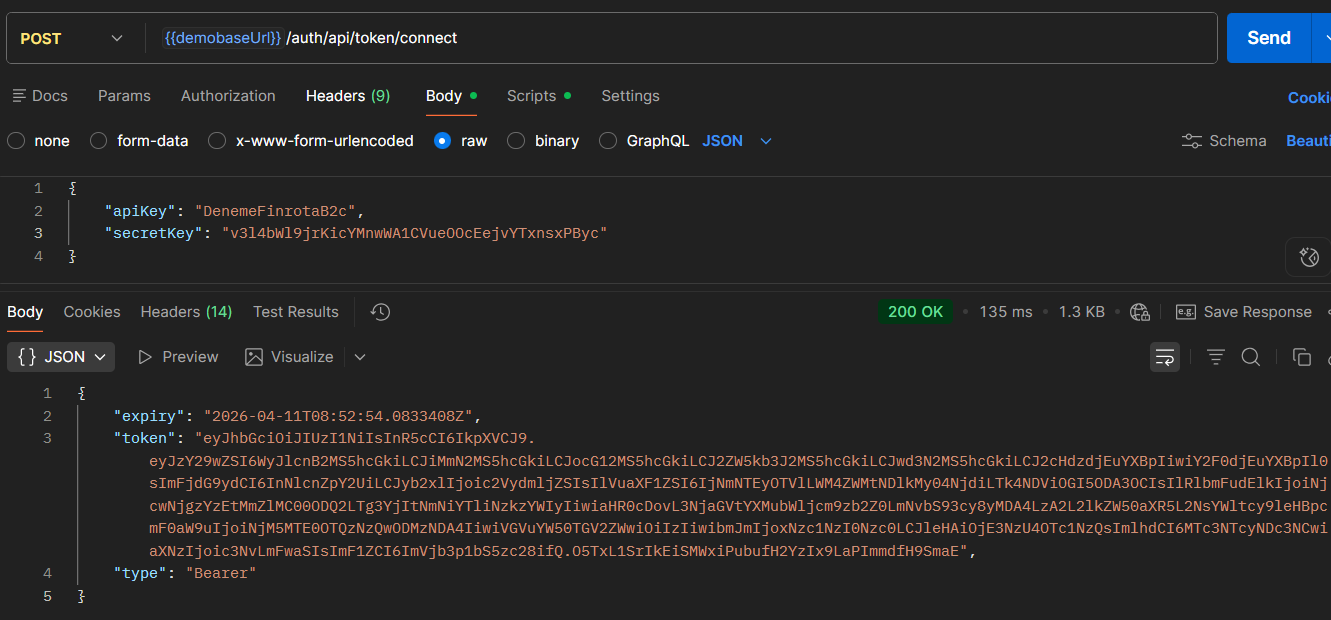
1 – AccessToken is Purchased
→ /auth/api/token/connect
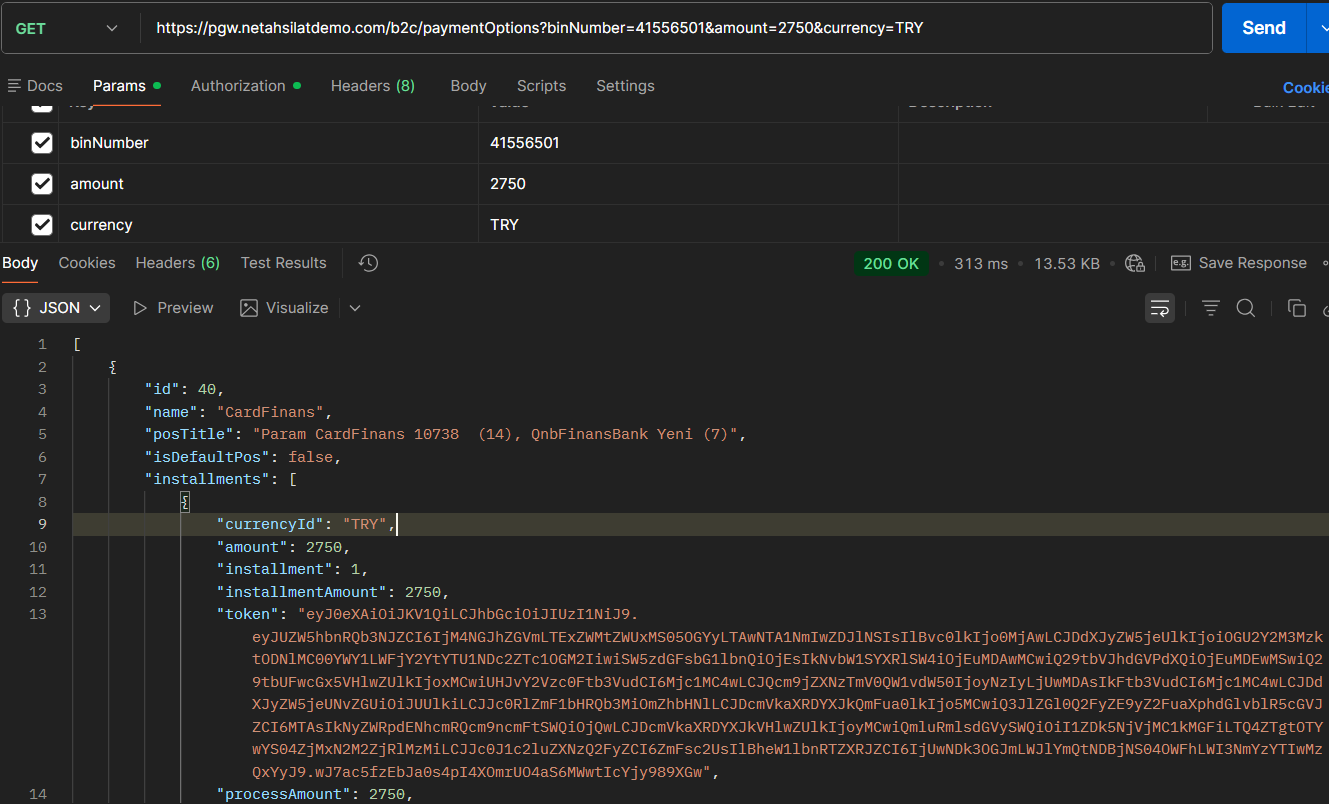
2 – Installment and POS Information is Returned
→ /b2c/paymentOptions
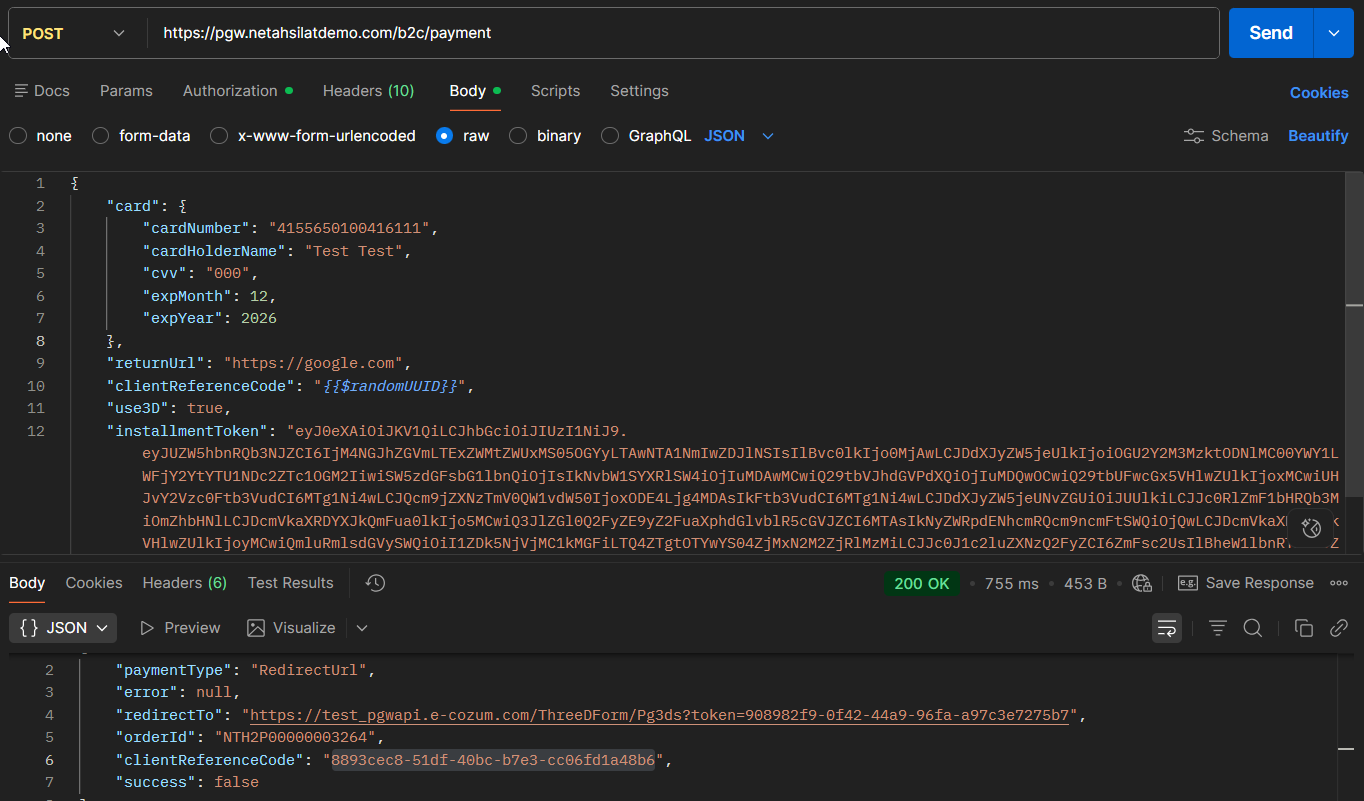
3 – Payment Starts
→ /b2c/payment
4 – (Optional) 3D Process
- If
use3D = true redirectToredirects to the URL- Bank verification is completed
- User returns to
returnUrl
10.2 PaymentOptions
Endpoint: GET /b2c/paymentOptions
Header
| Area | Type | Mandatory | Description |
|---|---|---|---|
| Proxy-Authorization | string | ✔ | Bearer {AccessToken} |
Note: AccessToken is used in some implementations of API flow (difference from widget)
Query Parameters
| Area | Type | Mandatory | Description |
|---|---|---|---|
| binNumber | string | ✔ | First 6-8 digits of the card |
| amount | decimal | ✔ | Transaction amount |
| currency | string | ✔ | Para birimi |
Response Model
Root Object
| Area | Type | Description |
|---|---|---|
| id | int | Kart program ID |
| name | string | Card program name |
| postTitle | string | POS description |
| isDefaultPos | boolean | Default POS information |
| installments | array | Installment options |
installments Object
| Area | Type | Description |
|---|---|---|
| currencyId | string | Para birimi |
| amount | decimal | Total transaction amount |
| installment int | Number of installments | |
| installmentAmount | decimal | Amount per installment |
| token | string | InstallmentToken (kritik) |
| processAmount | decimal | Transaction amount |
| commRate | decimal | Commission rate |
| posId | int | POS ID |
| commApplyTypeId | int | Komisyon tipi |
Critical Note
tokenfield (InstallmentToken) is required at checkout- Without this token the
/paymentcall will fail
10.3 Payment
Endpoint: POST /b2c/payment
Header
| Area | Type | Mandatory | Description |
|---|---|---|---|
| Authorization | string | ✔ | Bearer {AccessToken} |
Request Body
card Object
| Area | Type | Mandatory | Description |
|---|---|---|---|
| cardNumber | string | ✔ | Card number |
| cardHolderName | string | ✔ | Name on card |
| cvv | string | ✔ | CVV |
| expMonth | int | ✔ | Son kullanma ay |
| expYear | int | ✔ | Expiry year |
Root Areas
| Area | Type | Mandatory | Description |
|---|---|---|---|
| card | object | ✔ | Kart bilgileri |
| returnUrl | string | ✔ | 3D post redirect URL |
| clientReferenceCode | string | ✔ | Merchant order reference |
| use3D | boolean | ✔ | Using 3D Secure |
| installmentToken | string | ✔ | PaymentOptions’tan gelen token |
| customerIpAddress | string | ✔ | User IP address |
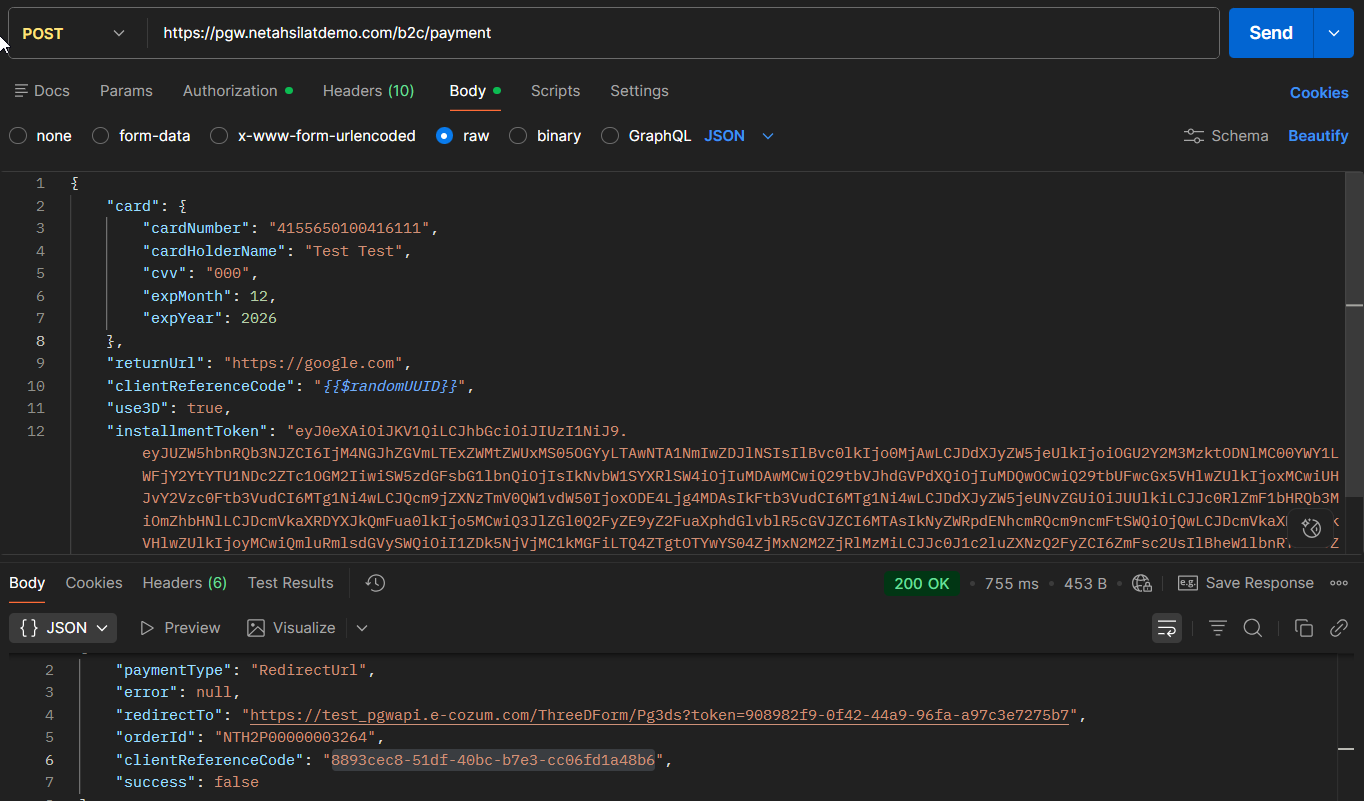
Request Example
{
 "card": {
   "cardNumber": "4155650100416111",
   "cardHolderName": "Test Test",
   "cvv": "000",
   "expMonth": 12,
   "expYear": 2026
 },
 "returnUrl": "https://merchant.com",
 "clientReferenceCode": "ORDER123",
 "use3D": true,
 "installmentToken": "INSTALLMENT_TOKEN",
 "customerIpAddress": "78.190.57.187"
}
Response Model
| Area | Type | Description |
|---|---|---|
| paymentType | string | RedirectUrl / DirectSale |
| redirectTo | string | 3D redirect URL |
| orderId | string | Finrota transaction ID |
| clientReferenceCode | string | Merchant reference |
| success | boolean | Transaction result |
| error | string | Error message |
10.4 3D Secure Stream
Scenario
When use3D = true is sent:
Response
{
 "paymentType": "RedirectUrl",
 "redirectTo": "https://bank-3d-url",
 "success": false
}
Flow
- Merchant backend → receives response
- Frontend → redirects the user to
redirectTo - User → verifies OTP at bank
- Bank → redirects the user to
returnUrl - Merchant → processes the result (success / failure)
Critical Points
redirectTomust be opened in the frontendreturnUrlendpoint must be idempotent- Duplicate check should be done for the same transaction
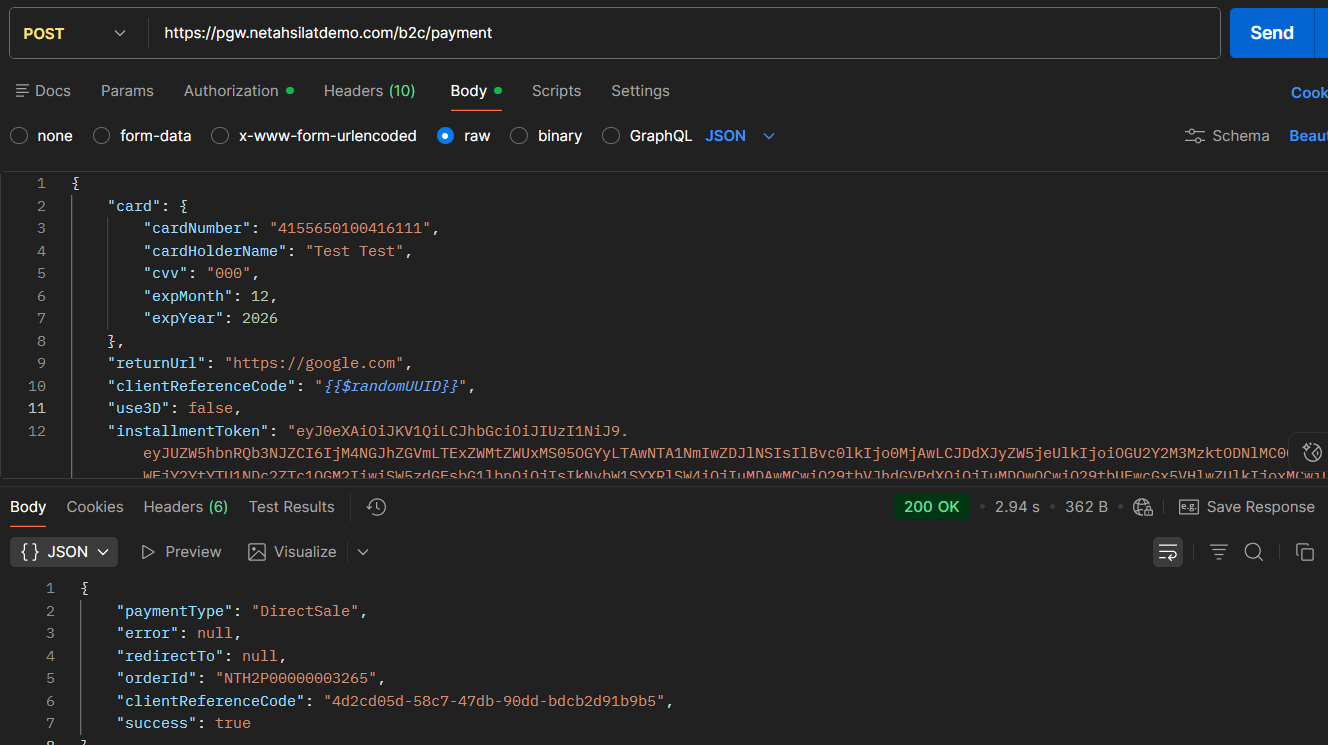
10.5 Direct Sale Flow
Response
{
 "paymentType": "DirectSale",
 "success": true
}
Flow
- Payment is completed instantly
- There are no additional redirects
- The result is taken from the response
10.6 Error Scenarios
| Status | Description |
|---|---|
| 401 | Token invalid |
| 400 | Missing / faulty parameter |
| 500 | System error |
| success=false | Bank or payment error |
10.7 API vs Widget Difference
| Konu | API | Widget |
|---|---|---|
| Kart verisi | Backend | Frontend |
| PCI payload | Merchant | Finrota |
| UX | Merchant manages | Ready |
| Token | AccessToken | WidgetToken + AccessToken |
14. API Payment Flow (Step-by-Step)
1 – AccessToken is Purchased
2 – Installment and POS Information is Returned
3 – Payment Starts
4 – (Optional) 3D Process
Payment Cancellation
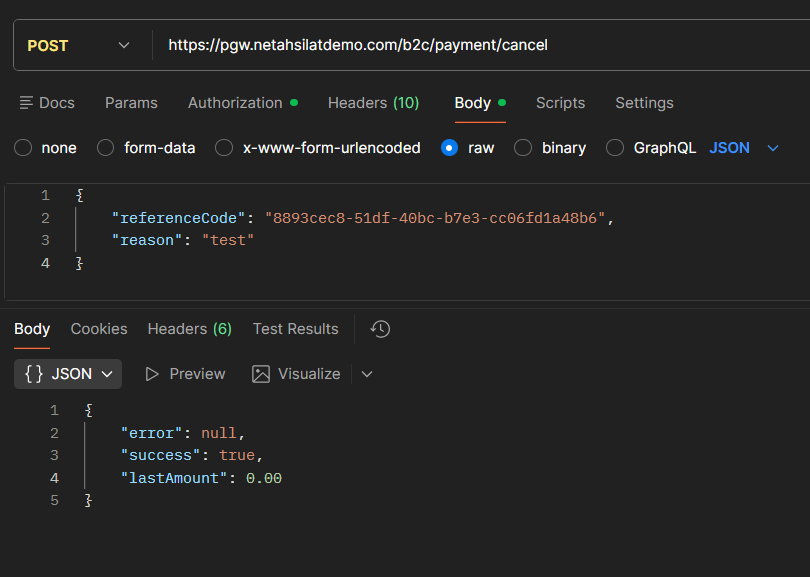
Payment Refund